


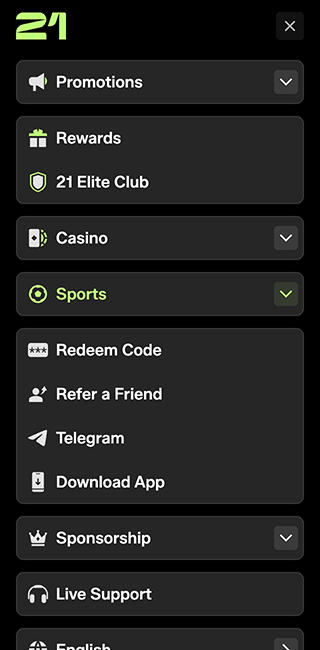
21.com works fine on a high-end phone. Go back a few years in hardware, though, and we would rather have a fast native app. That is our main complaint with the NZ mobile setup. You get a web app, with the casino, sportsbook, cashier and account controls available through your browser. There is no native Android or iPhone app to install. For occasional use, that is convenient enough. For a regular account, we would still like the choice.
Playing 21.com on Mobile
You can use the same account on your phone and desktop. The mobile site includes pre-match and live betting, slots, crash games, live casino, rewards, deposits, withdrawals and support.
The casino is large enough that search and provider filters save a lot of scrolling. Pragmatic Play alone has around 350 games. We would find the title we want rather than work through the whole collection on a phone.
Our 21.com casino review covers the selection and the bonus conditions that affect slots, live tables and crash games.
21.com Android App
NZ players use the browser rather than a native Android APK. You can keep the site as a bookmark or add it to your home screen.
In Chrome, the usual steps are:
- Open 21.com.
- Open the browser menu.
- Choose Add to Home screen, or the equivalent option on your device.
- Confirm the shortcut.
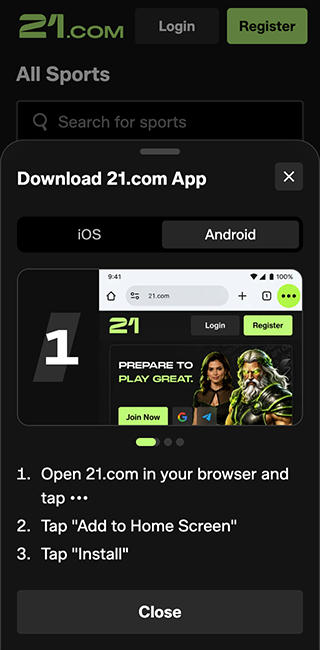
That gives you quick access without typing the address. It still opens the web app, so adding an icon does not change how the site runs.
21.com iPhone App
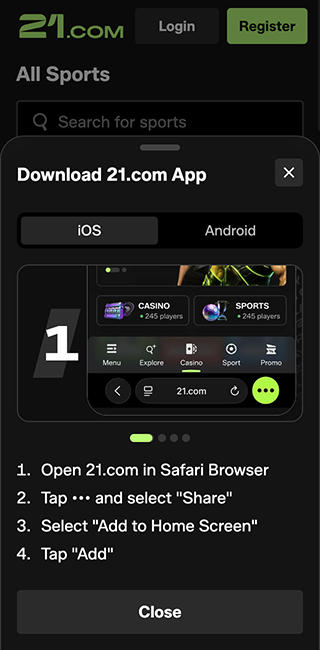
The iPhone setup is much the same. Open 21.com in Safari and log into your account. To add an icon, use the Share menu and choose Add to Home Screen. A bookmark works just as well if you prefer to keep everything in Safari. There is no native NZ iPhone app to download.
Performance on Newer and Older Phones
On high-end hardware, the web app is fine. We have less enthusiasm for the browser-only setup when the phone is a few years old. A fast native app would be welcome there.
We would try the site on the phone we intend to use before depositing. Open the casino, search for a game and move through the sportsbook. There is no need to guess how your own device will handle it.
If you mainly want sports, our 21.com sports betting review covers the betting options and sports welcome offer. Both pre-match and in-play betting are available through the mobile site.
Registration and Verification
You can register for 21.com with email, Google or Telegram. The email form asks for an email address, username and password, followed by the age and terms confirmation. Verification was completed in less than 30 minutes. Government-issued photo ID and payment-ownership proof can be requested, with further documents where needed.
We would finish the account checks early. Several promotions also require verified contact details, so it is worth sorting those out before choosing a bonus.
Payments on Mobile
You can fund your 21 account directly from your crypto wallet. Supported coins include USDT, USDC, Bitcoin, Ethereum, Solana, Litecoin, TRX, BNB and XRP, among others. Banxa and Swapped are available for buying crypto first.
Check the payment instructions before sending, particularly the coin and network. Use a wallet you control. We would welcome a card option as backup, but we would not spend half a mobile review explaining what a crypto casino is.
21.com Mobile Bonuses
The challenge promotion mentions an app download. That does not give NZ players a native app, and we would ask live chat about availability before trying to complete that task.
The standard casino and sports offers are separate:
| Offer | Size | Wagering condition |
|---|---|---|
| Casino welcome | Up to $5,000 plus 100 spins over four deposits | 40x the bonus within seven days |
| Sports welcome | 50% up to $500 on the first deposit | 8x the bonus within 14 days, at combined odds of at least 1.80 |
| First-week casino cashback | 20% of qualifying real-money net losses, capped at $100 | 1x the cashback within three days |
We prefer the cashback’s lighter requirement. The deposit matches need more thought.
For casino play, the games you choose affect how quickly the wagering counts. Live tables and crash games contribute only 10% to the welcome package. If those are what you open 21.com for, we would skip that match.
For sports, calculate how much qualifying betting you expect to do over the next fortnight. An offer that needs extra bets to clear is not helping much.
Mobile Support
Live chat is available 24/7. The team was quick and professional, with less of the canned back-and-forth we are used to from gambling support desks. Telegram and WhatsApp channels are available too. For verification, payments or an account question, we would go straight to live chat.
Pros and Cons
Pros
- Casino and sports are available through the same mobile account.
- The web app works fine on high-end phones.
- No download is needed.
- Live chat is available 24/7.
Cons
- There is no native NZ Android or iPhone app.
- Older hardware makes the lack of a fast native app more noticeable.
- A card payment option would be useful as backup.